




A clear, practical explanation of what actually triggers React re-renders and how to control them.
Understanding when components re-render forms the foundation of React performance optimization. Once you grasp what initiates renders, hooks like useMemo, useCallback, and React.memo become much clearer conceptually.
What Actually Triggers a React Re-render?
React schedules a component re-render whenever its state or props change—this is the core principle. All other re-render triggers are variations of this fundamental rule.
Most Common Triggers:
- State updates: Calling setState (or setSomething) schedules a render
- Prop changes: When a parent re-renders and passes new props, including fresh object/function references, the child re-renders
- Context changes: Updating a context value causes every subscribed component to re-render
- Parent re-renders: Even when props appear identical, recreating objects/functions counts as "new"
Here's a simplified visual:
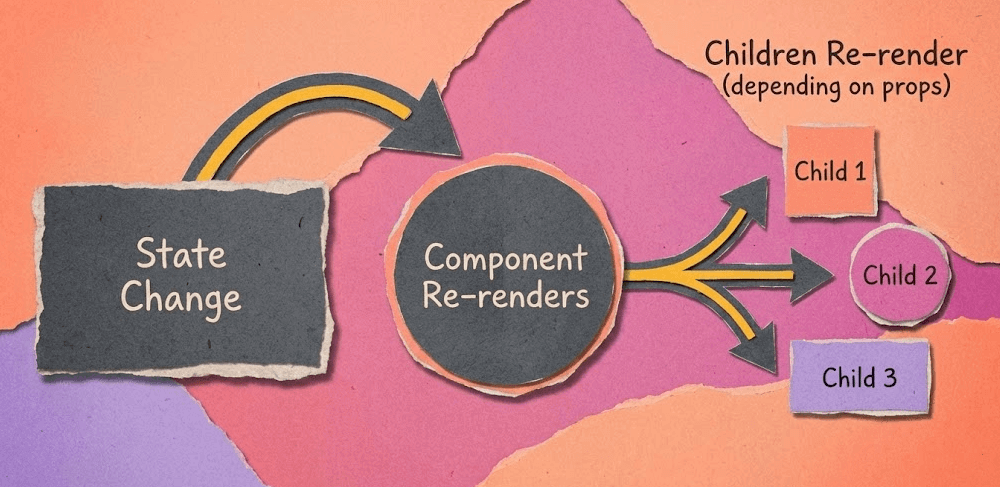
Simple Example: Re-render Trigger
function Counter() {const [count, setCount] = useState(0);return (<button onClick={() => setCount(count + 1)}>{count}</button>);}
Upon each click, React:
- Updates count
- Re-runs Counter()
- Recalculates the JSX
This behavior is normal and performs efficiently.
When a Parent Causes "Unexpected" Re-renders
Many developers find this example surprising:
function Parent() {const [value, setValue] = useState(0);return <Child data={{ value }} />;}function Child({ data }: { data: { value: number } }) {console.log("Child rendered");return <div>{data.value}</div>;}
Although value remains unchanged, the object literal { value } is freshly created each render, triggering a child re-render.
Solution:
const data = useMemo(() => ({ value }), [value]);
Now the child re-renders exclusively when value changes.
React.memo and "Are Props Equal?"
React.memo prevents unnecessary re-renders by performing shallow prop comparison.
const Child = React.memo(function Child({ value }) {console.log("render");return <div>{value}</div>;});
React skips rendering <Child /> when:
- Props didn't change according to shallow comparison
- Parent re-rendered but props remained identical
This approach proves powerful when applied deliberately.
The Most Important Insight
A re-render ≠ a DOM update.
React may invoke your component function again, yet the virtual DOM diff only refreshes what genuinely changed.
Generally, re-renders carry minimal cost. Performance problems emerge only when:
- Expensive computations occur during render
- New objects/functions are produced on every render
- Lists re-render unnecessarily
- Context causes widespread updates
Understanding this distinction allows you to optimize strategically rather than universally.
Key Takeaways
- React re-renders when state, props, or context change
- Parent re-renders frequently cause child re-renders
- New object/function references count as new props
React.memoreduces child renders when props stabilize- A re-render ≠ a DOM update—typically it's extremely fast
A clear mental model of React's render cycle dramatically simplifies every optimization decision.